Calls from your parent’s contacts and trusted numbers ring straight through. Calls your parent makes are never touched.
Step 1
Unknown callers are told the call is checked
They hear a short notice first. You can also have an assistant ask who is calling and why.
Step 2
The call comes through the app
Your family member answers in FamilyDefender and sees who is calling and what they said it is about.
Step 3
A tone or a whisper if it looks risky
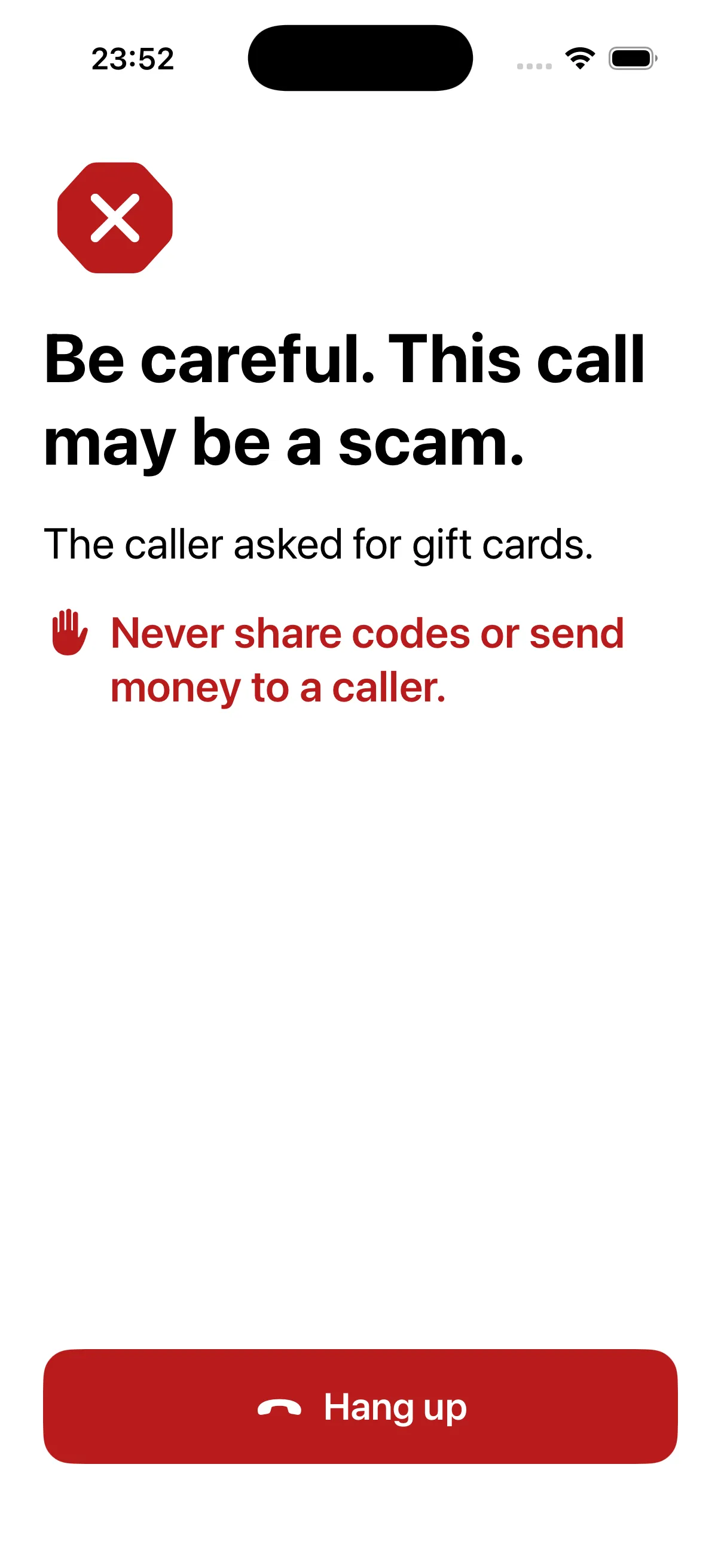
During the call they hear a short tone, or a whisper if it may be a scam.
Step 4
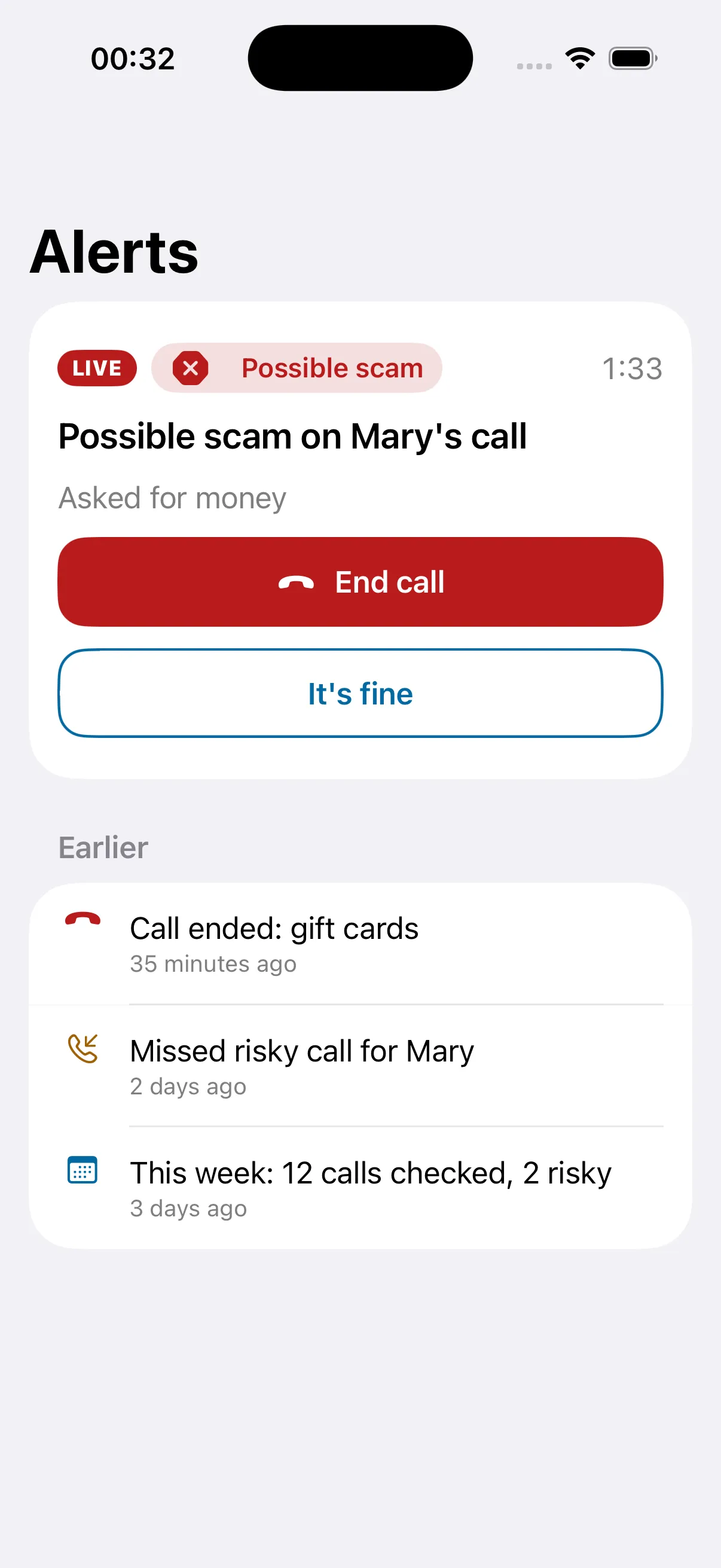
You get an alert and can end the call
You get a push with «End call» and «It’s fine». Clear scam signs end the call automatically.
Step 5
Private by design
Checked automatically. No person listens. Nothing is recorded.
What the caller hears
«This call is checked automatically by FamilyDefender to help prevent fraud. Connecting you now.»
What your parent hears on a risky call
«Be careful. This may be a scam. You can hang up.»
Features
Protection before, during and after the call
Before the call
Ask who’s calling first. An assistant answers unknown numbers and asks who is calling and why, with extra questions for «banks», «police» and «government». Robocalls don’t reach your parent. Off by default.
Trusted numbers ring straight through. Your parent’s contacts and numbers your family adds call as usual.
During the call
Live call check of both sides of the conversation, in any language.
Be careful pressure, account problems, «a relative in trouble», «don’t hang up».
Possible scam send or withdraw money, threats of arrest or fines, remote access, «don’t tell anyone».
Alerts to you
Red: an urgent push with «End call» and «It’s fine». The first answer counts.
Yellow: a quiet push.
You are also told about a risky call your parent missed.
Warnings for your parent
A tone on yellow when a call looks suspicious.
A whisper on red: «Be careful. This may be a scam. You can hang up.» The caller may hear it too, and scammers often hang up.
Calls ended automatically
Only in these cases. Each rule can be turned off. Your parent always hears why the call ended, and the caller can call back and be checked again.
Family check.The caller says they are family, and you answered «No» to «Is this someone in your family?».
Stop reading out numbers.The caller asked for a card, account or Social Security number, or a text-message code, and your parent starts reading out 4 or more digits.
Stop gift card and crypto payments.The caller demands payment in gift cards, card codes or through a crypto ATM.
Stop fake police and officials.«Police», a «court» or the «IRS» demands money and asks to keep it secret.
End if no one answers the alert.The call has been red for 2 minutes and nobody answered the alert.
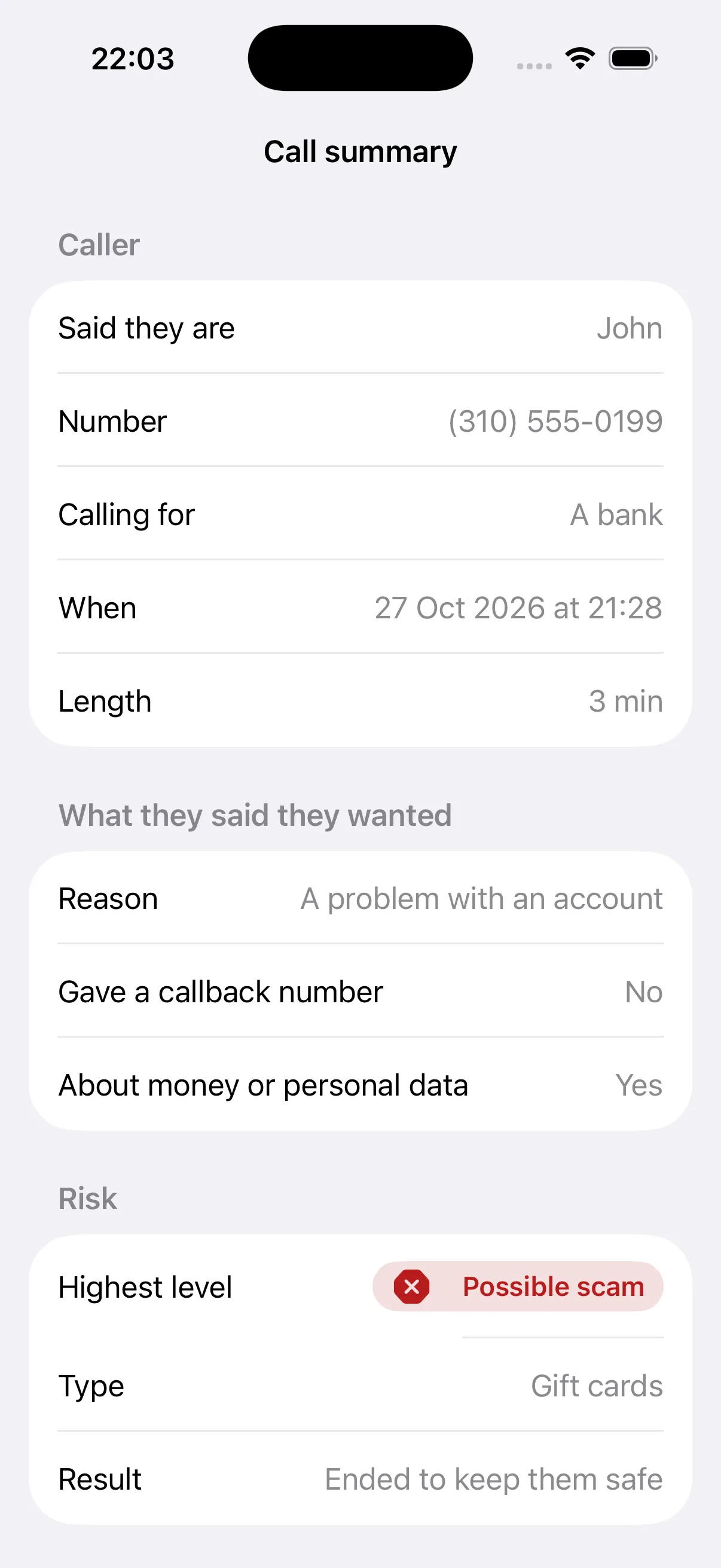
Alerts with «End call»Call summaries, no transcript
Also in the app: a practice call to see the check work, call history with risk levels, and live setup progress. Works with major US carriers.
Checked automatically. No person listens. Nothing is recorded.
No audio, no transcript
We keep no audio and no transcript of any call.
Short summaries, then deleted
Risky calls leave a short summary: who called and why. It is deleted after 90 days.
You never hear the call
Guardians get alerts and summaries, never the conversation.
For your parent
Made to be easy for mom and dad
Their choice
Your parent installs the app, enters your 6-digit code and gives consent themselves. This is help from family, not monitoring.
Big, clear screens
Large text and buttons, and clear words on every call: Looks normal, Be careful, or Possible scam.
Short lessons
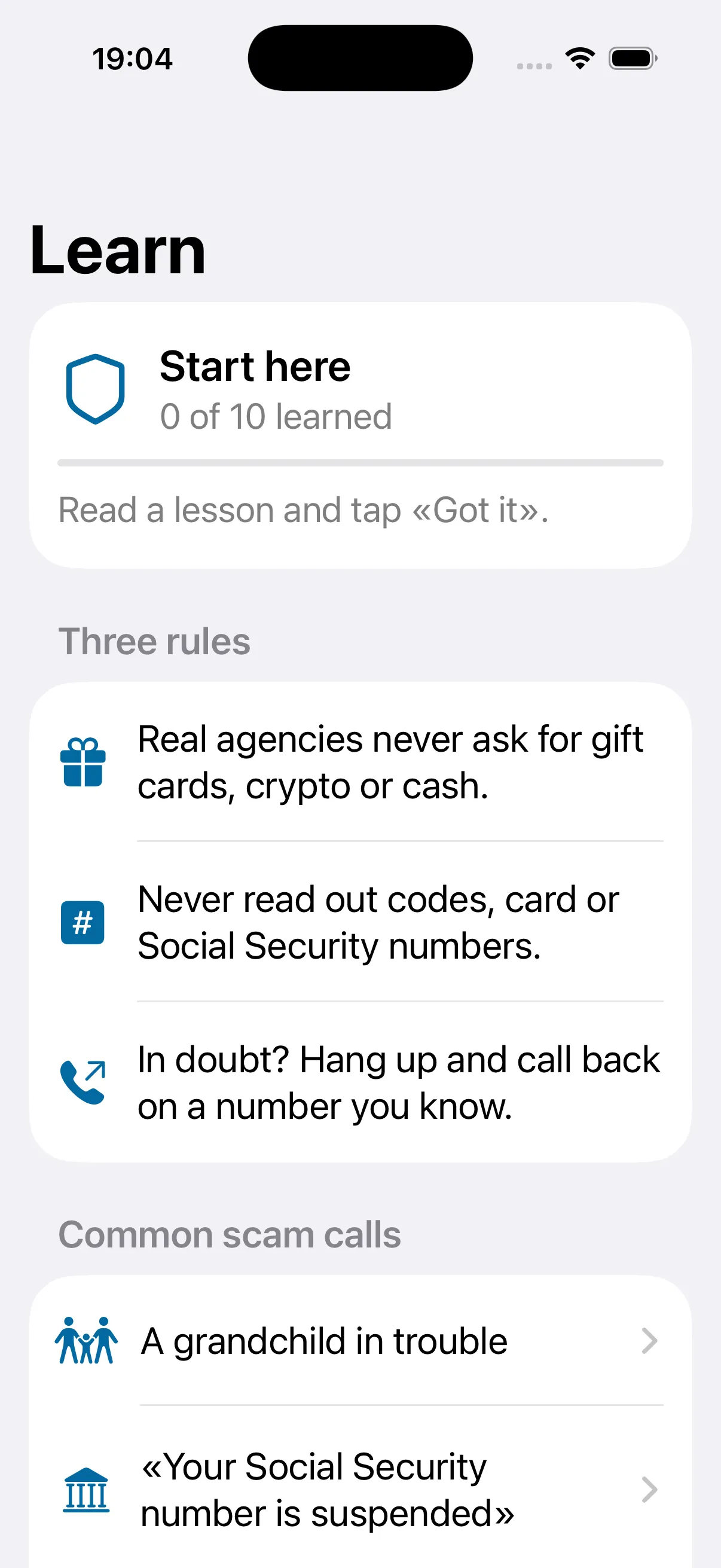
10 lessons on the most common scam calls, from «a grandchild in trouble» to «read me the code». Read them here.
Set up in minutes
The app shows a call forwarding code. Your parent copies it and dials it in the Phone app. You see each step as it happens.
A clear warningLearn
Why FamilyDefender
Built for the moment it matters
During the call, not after
Spam blockers look at the number. FamilyDefender checks what is said, so a scammer calling from a clean number can still be spotted.
Your family can step in
You get an alert while the call is still happening and can end it with one tap.
Ends calls only in clear cases
A short, published list of scam signs. Each rule can be turned off.
Callers are always told
Every unknown caller first hears that the call is checked automatically.
Your parent agrees and stays in charge
They give consent in their own app and can see everything it does.
Scam cases
Real calls, real losses
Documented cases and how each one could have been stopped.
Basic protects you and one family member. No free trial.
Basic · 1 year
Save 17%
$199.99 / year
$16.66/mo
Basic · 3 months
$59.99 / 3 months
$19.99/mo
Family
Coming soon
Up to 6 people in one plan.
Protects 2 people: you and one family member
Live check of unknown calls
Alerts with «End call»
Tone and whisper warnings for your parent
Calls ended in clearly listed scam cases
Learn lessons and a practice call
Coming soon to theApp StoreComing soon toGoogle Play
Billed through the App Store or Google Play. Renews automatically until you cancel. Cancel anytime at least 24 hours before the period ends: on iPhone in Settings → Apple ID → Subscriptions, on Android in Google Play → Payments & subscriptions. No free trial.
Questions
Does anyone listen to the calls?
No. Checked automatically. No person listens. Nothing is recorded. We keep no audio and no transcript of any call. For risky calls we keep a short summary, such as who the caller said they were and why they called, and delete it after 90 days.
What do I see as a guardian?
Alerts and short summaries of risky calls: the risk level, who the caller said they were, and what the assistant did. You never hear the call and never see a transcript.
Does my parent have to agree?
Yes. Your parent installs FamilyDefender on their own phone and gives consent there, in their own app. They can see how it works and can remove a guardian.
Will it block calls from her doctor or bank?
No. Calls come through as usual. A call is ended automatically only in a few clearly listed cases, and the caller can call back and be checked again. It may sometimes warn about a real call.
What about calls from people she knows?
Calls from your parent’s contacts and from trusted numbers your family adds ring straight through, without any check. Calls your parent makes are never touched.
Which phones and carriers work?
FamilyDefender is coming to iPhone and Android and works with major US carriers.
How much does it cost?
Basic protects 2 people: you and one family member. It costs $59.99 for 3 months or $199.99 for a year, billed through the App Store or Google Play. Renews automatically until you cancel. Cancel anytime at least 24 hours before the period ends: on iPhone in Settings → Apple ID → Subscriptions, on Android in Google Play → Payments & subscriptions. No free trial.
How do I stop it?
Turn protection off in the app, then remove call forwarding on your parent’s phone so calls keep arriving. Our turn-off page lists the codes for each carrier. Turn-off codes
Is it an emergency service?
No. Calls to 911 are never screened or ended. Keep another way to reach 911.
Be there when the call comes
FamilyDefender helps spot scams but cannot catch every one.
Coming soon to theApp StoreComing soon toGoogle Play
For iPhone and Android. Works with AT&T, T-Mobile, Verizon and other major US carriers. Not an emergency service. Calls to 911 are never screened or ended. Keep another way to reach 911.